By Alena K., payments content, covering crypto processing for iGaming and eCommerce operators.
Updated: 2026-07-07
The buyer paid for the order in crypto, the transaction is visible on the blockchain, and the payment provider confirmed the receipt. But in Shopify or WooCommerce the order did not appear, or its status did not update. This does not necessarily mean there is a problem with the payment. Most often the failure happens in the integration chain between the on-chain event, the payment provider and the store platform.
This article looks at why the blockchain, the provider and the store are different data sources, where the connection between them usually breaks, and how to diagnose a situation where the payment is confirmed but the order in the store has not updated.
The blockchain, the payment provider and the store are different layers
When a buyer transfers cryptocurrency, the event passes through several systems. Each of them records only its own part of the process.
| Layer | What it records | What it does not do on its own |
|---|---|---|
| Blockchain | tx hash, network, address, amount, inclusion in a block | Does not create or update the order |
| Payment provider | Checkout or invoice, amount received, status, confirmations | Does not change the order status without integration |
| Shopify/WooCommerce | Order, payment status, order status | Does not read the blockchain directly |
Transaction confirmed on-chain means the transaction went through at the network level. Invoice paid means the payment provider recognised the payment. Order paid or Processing means the store received the event and updated the order. These states do not sync on their own. If an order was not created or did not update, it usually means the integration between the provider and the store did not fire somewhere.
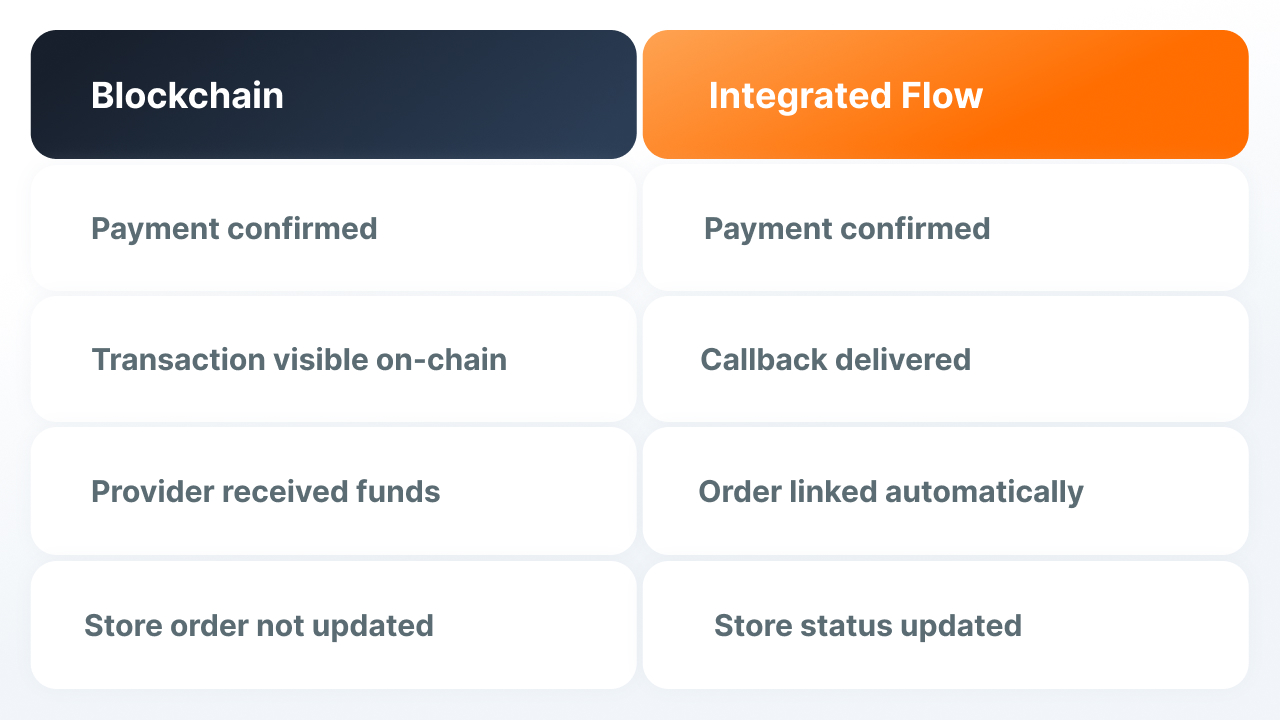
Between payment and order update there is a chain of eight steps
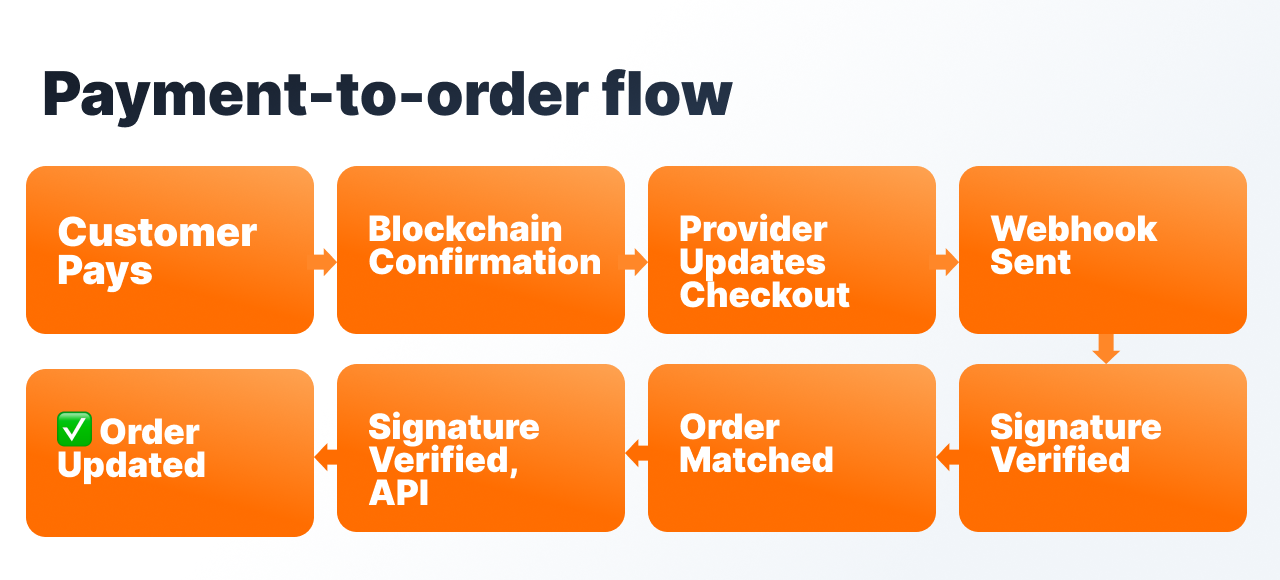
The typical path looks like this: the buyer sends the transaction, the network confirms it, the payment provider records the receipt and changes the checkout or invoice status, the provider sends a webhook or callback to the merchant's endpoint, the endpoint receives the event and checks the signature, the backend matches the checkout ID or reference with the order ID, the backend calls the Shopify API or WooCommerce gateway logic, and Shopify or WooCommerce updates the order. If any step breaks, the buyer may have genuinely paid, but the store will not see it automatically.
It's worth noting that a payment provider usually does not work with just two states, paid and not paid. There can be intermediate and exceptional statuses: waiting for confirmations, the amount arrived partially, the payment arrived late, there was an overpayment. Because of this, a transaction being in a block does not always mean the order can immediately move to a final status.
Five common reasons why the payment exists but the order did not update
The buyer chose the wrong network or token. For example, the buyer sent USDT on ERC20 when the checkout was expecting TRC20, or sent a token on a network the provider does not support for that payment. In the explorer the transaction may look successful, but the provider will not match it with the right checkout.
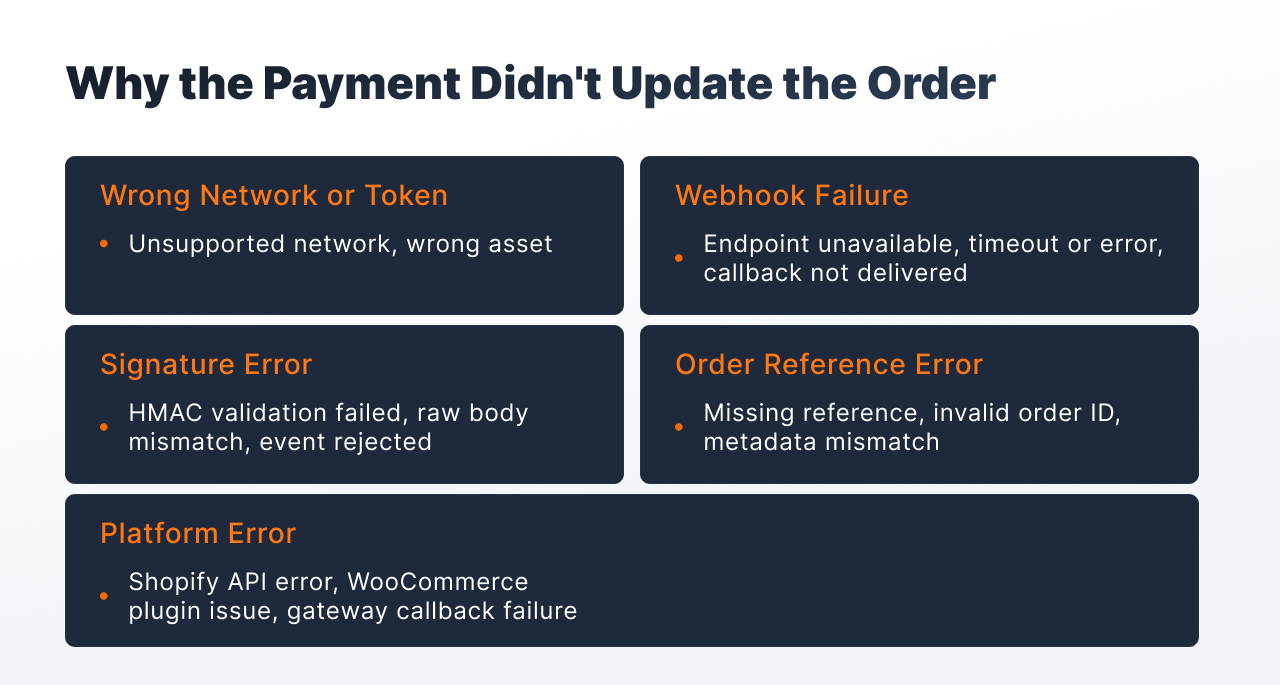
The webhook did not reach the store. The provider recognised the payment, but the store's endpoint was unavailable, returned an error, or did not respond in time. Shopify retries a failed webhook delivery up to eight times over a four-hour window and then removes the subscription if it keeps failing (Shopify, 2026); WooCommerce disables a webhook after five consecutive non-2xx responses (WooCommerce, 2026). Either way, the provider ends up seeing a paid invoice while the store stays on the old status.
The webhook signature did not pass verification. The webhook arrived, but the backend rejected it. A common cause: the code checks the HMAC against an already modified JSON body after middleware, not against the raw body. WooCommerce webhooks sign the raw payload with HMAC-SHA256 and pass it in the X-WC-Webhook-Signature header (WooCommerce, 2026); if the backend hashes a reformatted copy of the payload instead of the exact bytes received, the signature will not match and the event is rejected.
The order reference did not match. The webhook was accepted, the signature is correct, but the backend cannot find the order. For example, the order ID was not passed when the checkout was created, the ID format is different from what is expected, or the metadata does not contain the needed link.
The error happened on the Shopify or WooCommerce side. The backend received the event and tried to update the order, but the platform returned an error. On Shopify this is often an access-scope issue: the standard write_orders scope only covers the last 60 days of a shop's orders, and apps needing broader access must request it separately (Shopify, 2026). On WooCommerce it is more often the gateway code, the callback endpoint, block checkout compatibility, or a plugin conflict.
| Cause | How the symptom looks | Where to check |
|---|---|---|
| Wrong network or token | Transaction exists in explorer, invoice is not paid | Network, contract address, supported assets |
| Webhook did not arrive | Provider sees payment, store is silent | Delivery logs, response code, endpoint URL |
| HMAC error | Webhook received but rejected | Raw body, secret key, middleware order |
| No order reference | Webhook successful, order not found | Checkout metadata, reference, order ID format |
| Platform error | Event processed, API call failed | Shopify app scopes, WooCommerce gateway logs |
Shopify will not know about a crypto payment without a backend integration
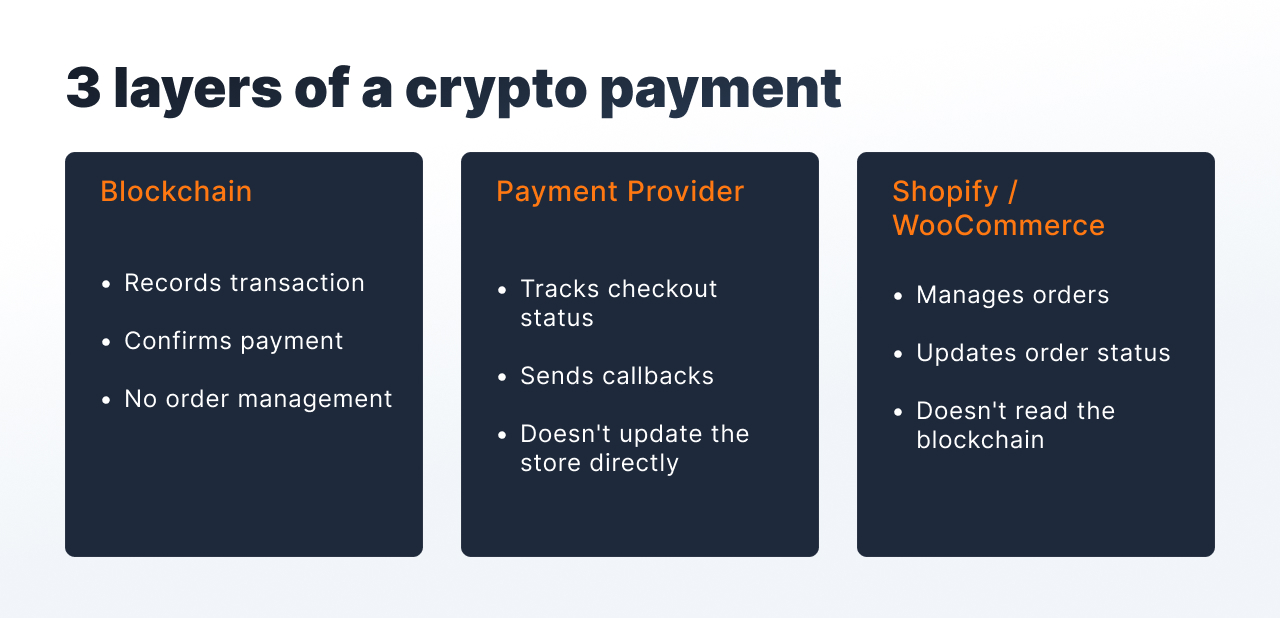
Shopify does not read the blockchain and does not update the order just because an external transaction went through. Crypto payment requires a backend or app layer: it receives the event from the payment provider, checks it, links it to the order and updates Shopify through the API.
For Shopify diagnostics, look at the delivery and processing logs rather than the block explorer. The Dev Dashboard's Monitoring page shows delivery counts and response time by topic over the past seven days, and the Logs page shows individual deliveries filterable by topic, status, and destination shop, though the data can lag by several minutes (Shopify, 2026). A 200-series response is the only thing Shopify counts as a successful delivery; anything else counts as a failure and consumes one of the eight retry attempts (Shopify, 2026).
In WooCommerce, the order only updates through server-side gateway logic
In WooCommerce, a payment button or redirect does not by itself make an order paid. After a successful payment, the gateway code must process the callback and call the right server-side logic. This is what moves the order to the correct status and triggers further processing.
| WooCommerce status | What it means |
|---|---|
| Checkout draft | Order created when entering block checkout, but payment not completed |
| Pending payment | Order created, payment not yet confirmed |
| On hold | Payment requires manual review or delayed confirmation |
| Processing | Payment completed, order can be fulfilled |
| Failed | Payment did not go through or the gateway returned an error |
Sometimes "the order did not appear" means the order exists but stayed in Checkout draft. WooCommerce introduced this status specifically for block-based checkout, where the order is created and updated as the customer fills in the cart or checkout block, holds the reserved stock for around 10 minutes, and is cleaned up automatically if it's never completed (WooCommerce, 2020). If the payment never reaches the gateway code, the order never moves out of that draft state into Pending payment or Processing.
Another common source of confusion is webhooks. Core WooCommerce webhooks send events from the store outward. An incoming callback from a crypto provider must be handled separately, through a WC-API hook inside the gateway plugin or through a WordPress REST endpoint. For a server-to-server callback you cannot rely on cookie auth or nonces, because the external provider is not inside the user's WordPress session. The endpoint must be built for an external request, check the signature, and safely process the payload.
Diagnostics: what to check step by step
If the buyer paid but the order did not update, the best approach is to go through the chain in order.
1. Blockchain. Check the tx hash, network, token or contract address, recipient address, amount, inclusion in a block, and the required number of confirmations. Make sure the network and token match what the checkout was expecting.
2. Payment provider. Check the checkout or invoice ID, the expected and received amount, the status, the payment expiry, and the external order reference in the metadata. If the status is intermediate, the order may not be ready to update yet.
3. Webhook delivery. Check the endpoint URL, response code, response time, delivery attempts, and the signature verification result. For Shopify, check the Dev Dashboard delivery logs. For WooCommerce, check the gateway plugin logs and endpoint.
4. Backend endpoint. Check the raw payload, HMAC validation, mapping of checkout ID to order ID, idempotency store, exception logs, and the task queue. For WordPress, separately check route registration and the endpoint access model.
5. Store platform. For Shopify, check the order or draft order, app scopes, and the update API call. For WooCommerce, check the order status, order notes, gateway callback path, block or shortcode checkout compatibility, and plugin logs.
After diagnostics, manual reconciliation may be needed: link the paid checkout to the order, update the status manually, and record an incident note. This is a normal operational step if the automatic chain did not fire.
Where this doesn't apply
Diagnosing this chain assumes the merchant already has a backend or app layer connecting the payment provider to the store, and that the payment provider itself sends a webhook or callback with a checkout reference. If a merchant is manually reconciling crypto payments without any integration at all, the "which step broke" framework above doesn't apply, since there's no automated chain to diagnose. It's also not the right lens for pure custody or wallet issues (funds sent to the wrong address, a scam invoice, or a stuck transaction with no confirmations at all). Those are blockchain-layer problems, not integration-layer ones, and need a different diagnostic path.
Finassets: checkout session, callback and reference for linking to the order
The "payment went through but order was not created" scenario usually happens where there is no stable connection between the blockchain event and the order update. For a store it is important that the payment layer provides a unique session, a clear status, and a callback with a reference to the order.
Structured Checkout creates a separate payment session for each order. The session is linked to a reference that the merchant passes when creating the checkout, for example the order ID in Shopify or WooCommerce. When the payment changes status, Finassets sends a callback to the merchant's endpoint. The store's backend receives the callback, checks the signature, matches the reference with the order ID, and updates the order through the API. Finassets covers the payment layer, meaning a unique session, payment status, and callback; the order update in Shopify or WooCommerce is built on top of this backend integration.
Networks and assets supported include TRC20, ERC20, BEP20, and 70+ assets. A transaction is typically identified within about 15 seconds, with the balance credited within about 30 seconds after network confirmation (typical figures; may vary depending on the network and processing conditions). The TRON Energy Saving System pre-purchases Energy to fix the cost of a TRC20 transfer before confirmation, reducing the fee by up to 50%+ compared with the burn model, depending on Energy availability and network conditions (based on client results; individual outcomes vary). Pricing runs on a progressive scale (0.40% → 0.30% → 0.25% → 0.20% by volume). Onboarding takes 2–7 business days, subject to KYB and compliance review.
Discuss API integration for Shopify or WooCommerce with the Finassets team.
The cause is usually diagnosable, not mysterious
If the transaction is visible in the explorer but Shopify or WooCommerce did not update the order, this is usually not a blockchain problem. The cause is more often in the integration chain: wrong network, a webhook that did not arrive, a signature error, a missing order reference, or a failure on the platform side. Each of these has a verifiable cause and a clear diagnostic process, and none of them requires guessing.
If you need help designing the integration or working through an incident, get in touch with the Finassets team.
FAQ
Why does Shopify or WooCommerce sometimes not show a crypto order that's confirmed on the blockchain? Because the blockchain, the payment provider, and the store are three separate systems that don't sync automatically. A confirmed transaction only means the network accepted it; the store only updates once the provider sends a webhook, the backend verifies and matches it to an order, and an API call actually changes the order status. If any link in that chain breaks, the payment can be completely valid while the store shows nothing.
What are the most common reasons a paid crypto order doesn't update in Shopify or WooCommerce? The five most common causes are: the buyer used the wrong network or token for the checkout, the webhook never reached the store's endpoint, the webhook arrived but failed signature verification, the backend couldn't match the webhook to an order reference, or the platform itself returned an error when the backend tried to update it. Each has a different symptom and a different place to check, from block explorer data to delivery logs to app permission scopes.
Why would a webhook signature check fail even though the payment provider sent the correct webhook? This usually happens when the backend verifies the HMAC signature against a version of the payload that middleware has already parsed or reformatted, instead of the exact raw bytes the provider sent. WooCommerce, for example, signs the raw JSON payload with HMAC-SHA256 in the X-WC-Webhook-Signature header (WooCommerce, 2026); any reformatting before verification changes the bytes being hashed and breaks the match even though nothing is actually wrong with the payment.
What does WooCommerce's "Checkout draft" order status actually mean? Checkout draft is a status WooCommerce introduced specifically for block-based checkout. The order is created as soon as the customer starts filling in the cart or checkout block, updates as they go, and reserves the relevant stock for about 10 minutes before an automatic daily cleanup removes abandoned drafts (WooCommerce, 2020). An order stuck in this status usually means the payment never reached the gateway code, not that the payment failed outright.
How does Shopify limit which orders an app can read or update? Access depends on the app's granted scopes. The standard write_orders scope lets an app create and update order data, but by default it only covers a shop's last 60 days of orders; apps that need older or broader order access have to request that separately from Shopify (Shopify, 2026). If an integration was built before this limitation was understood, older orders may silently fail to update even when everything else in the chain works.
What should I check first if a customer says they paid but the order isn't showing? Start with the blockchain explorer to confirm the transaction exists, went to the right network and address, and has enough confirmations. Then check the payment provider's checkout or invoice status, since a transaction can be valid on-chain while the provider still shows it as pending or partial. Only after confirming both of those does it make sense to move to webhook delivery logs and backend matching logic, since most "payment exists but nothing happened" cases break somewhere after the provider, not before it.
Can Shopify or WooCommerce read the blockchain directly to confirm a crypto payment? No. Neither platform has native blockchain awareness. Shopify and WooCommerce both rely entirely on their integration layer, meaning a backend or app that receives a webhook from the payment provider, verifies it, and calls the platform's API, to know that a crypto payment happened at all. Without that layer, a fully confirmed on-chain transaction has no way to reach the store.