By Alena K. · Last updated: 2 November 2026
Your customers don't only hold Bitcoin. Many pay with stablecoins like USDT and USDC, or on networks like Solana and TRON. If your checkout only takes Bitcoin, those buyers pay another way or leave.
An altcoin payment gateway fixes that. It lets your business accept cryptocurrencies other than Bitcoin, checks each payment onchain and credits your balance. This guide shows which altcoins to accept, what it costs and how to set it up.
|
Key takeaways
|
What is an altcoin payment gateway?
An altcoin payment gateway is a service that lets a business accept cryptocurrencies other than Bitcoin. It creates a payment request and shows the customer the coin, network and amount. Then it confirms the transaction onchain and credits the merchant. Most gateways handle both Bitcoin and stablecoins.
A Bitcoin-only processor covers one coin. A multi-coin crypto payment gateway covers many coins and networks through one integration: one dashboard, one set of reports and one API. New to the topic? Start with our crypto payment gateway guide.
What are altcoins?
An altcoin is any cryptocurrency other than Bitcoin, according to the CoinMarketCap glossary. The name is short for "alternative coin". Ether (ETH), Solana (SOL), TRON (TRX), XRP, Litecoin (LTC) and Dogecoin (DOGE) are all altcoins. Stablecoins like Tether (USDT) and USD Coin (USDC) technically count too.
CoinGecko listed about 17,400 coins in June 2026, according to CoinLaw. For payments, only a few dozen matter. Those are the coins with deep liquidity and wide wallet support.
On October 23, 2026, Bitcoin made up about 60% of total crypto market value, per CoinMarketCap data reported by CoinStats. The other 40% sat in altcoins and stablecoins.
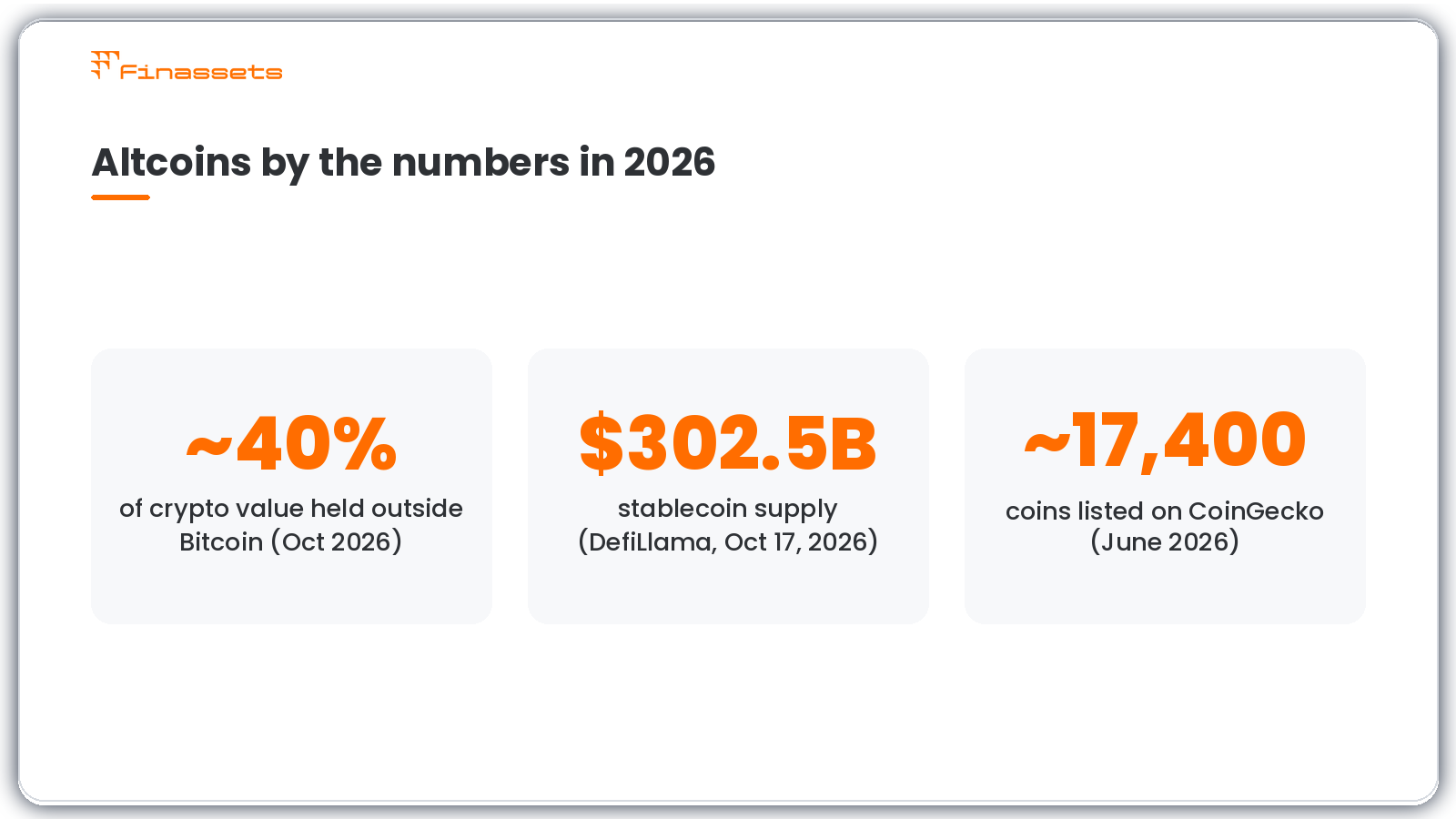
Altcoins held about 40% of crypto market value in October 2026.
How an altcoin payment gateway works
An altcoin payment gateway works in five steps. The customer picks a coin and network, and the gateway creates a payment request. The customer sends the funds, the blockchain confirms them, and the gateway credits the merchant and notifies the store.
- The customer chooses a coin and network at checkout, for example USDT on TRON (TRC20).
- The gateway creates a payment with the exact amount, a deposit address and a payment window.
- The customer sends the payment from their own wallet.
- The network confirms the transaction. How long this takes depends on the network.
- The gateway credits the merchant and sends a webhook, so the store marks the order as paid.
Optionally, the gateway converts the incoming altcoin into a stablecoin, so you hold a steady dollar value.
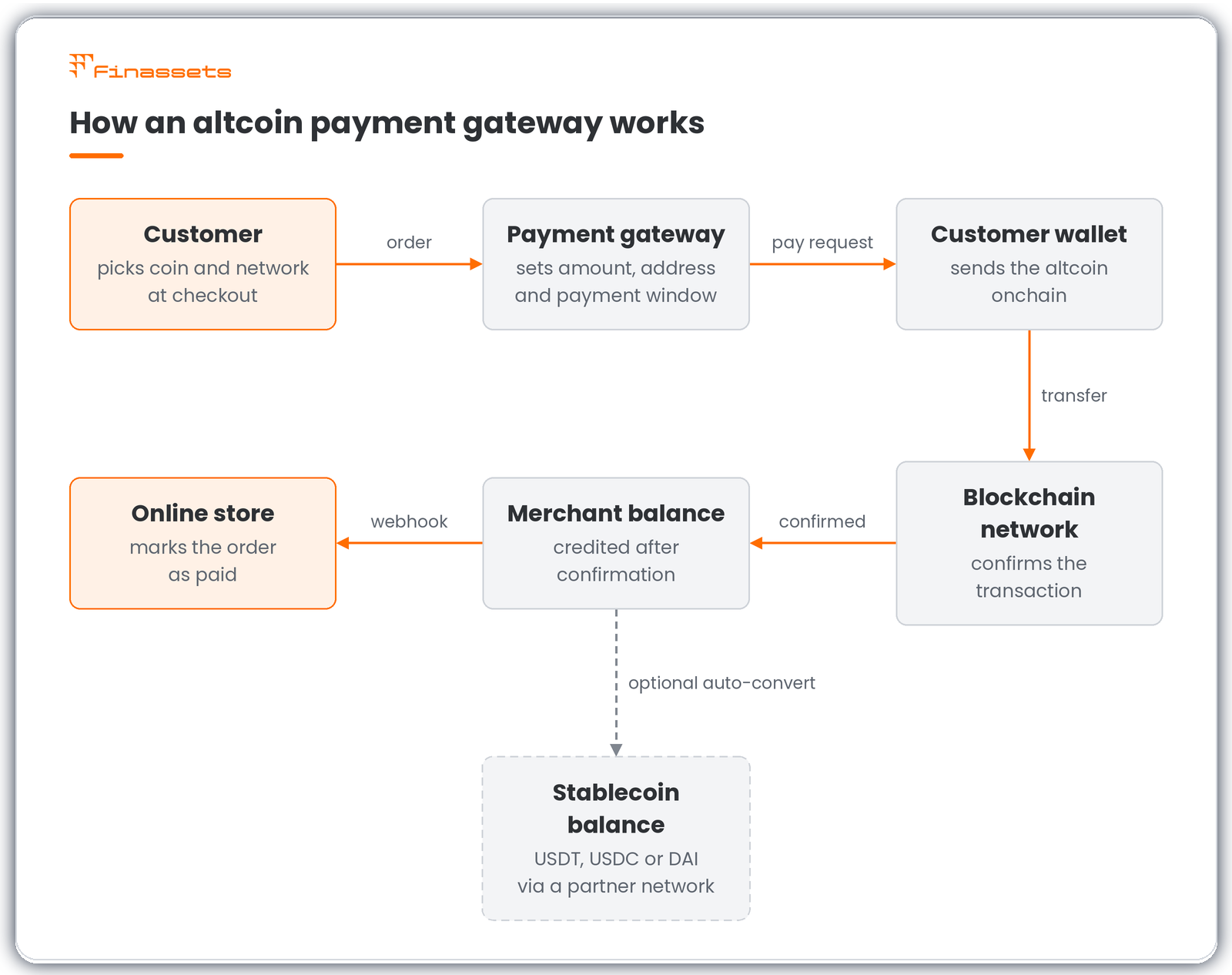
How a customer's altcoin payment moves from checkout to the merchant's balance.
For example, Finassets' crypto checkout adds a checkout page to your website or app. It verifies each payment onchain and tracks its status in real time in the back office. Deposits are typically credited about 30 seconds after network confirmation (typical figure; varies by network).
Which altcoins should your business accept?
Most businesses should start with stablecoins plus three to five low-fee networks their customers already use. That covers most crypto buyers without making checkout confusing. Add large altcoins like Ether only when customers ask, and review your list every few months.
Stablecoins: USDT, USDC and DAI
Dollar-pegged stablecoins help limit price swings, but the net amount you receive depends on applicable fees. Two coins lead the market. On October 17, 2026, USDT and USDC held 84.67% of a $302.5 billion stablecoin supply, per DefiLlama data reported by EconoTimes.
Accept each stablecoin on the networks your customers use most. USDT is common on TRON (TRC20), Ethereum (ERC20) and BNB Smart Chain (BEP20).
Fast, low-fee payment networks
Some altcoins are built for quick transfers. These include TRON (TRX), Solana (SOL), BNB Smart Chain (BNB), XRP and Toncoin (TON). On TRON and BNB Smart Chain, payments typically confirm in seconds to minutes.
Solana got faster in October 2026. On October 21, its Alpenglow upgrade went live and cut finality from about 12.8 seconds to about 150 milliseconds, The Block reported. Finality is the point when a transaction can no longer be reversed. For you, faster finality means you can ship goods or unlock a service sooner.
Large-cap altcoins your customers hold
Some customers prefer coins they already hold, such as Ether (ETH), Dogecoin (DOGE) or Cardano (ADA). These coins widen your reach, but their prices move more. Ethereum can be also slower to settle. Sometimes transaction becomes final after more than 10 minutes, according to CoinDesk.
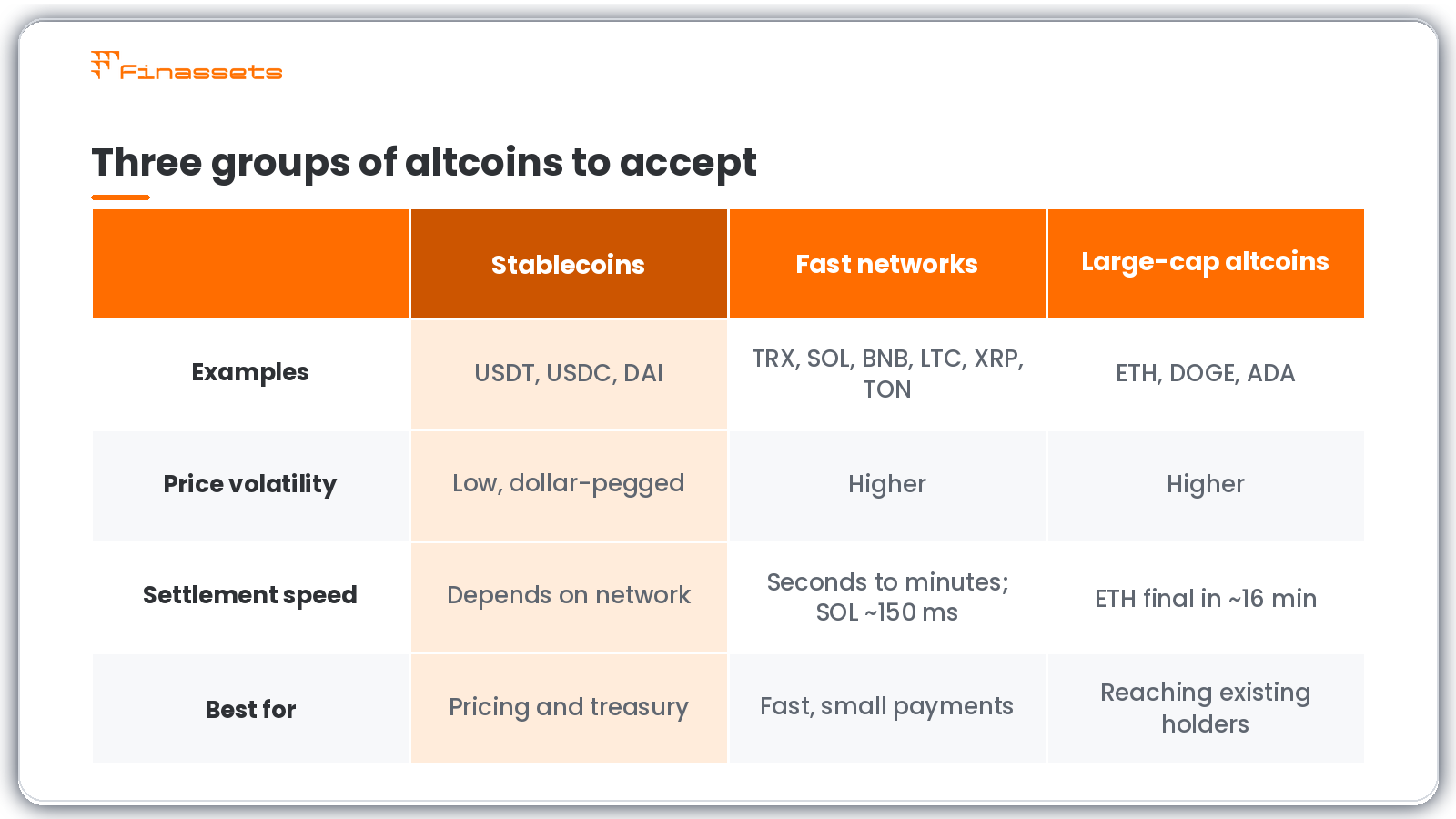
Three groups of altcoins and when each one makes sense for a business.
Finassets supports 70+ cryptocurrencies across all three groups, from USDT and USDC to SOL, TRX, TON, XRP and DOGE. See Finassets’ crypto payment solutions.
What changed for altcoin payments in 2026
Four October 2026 developments matter for merchants. Altcoins lost value faster than Bitcoin, stablecoin supply stayed above $300 billion, and two major networks moved toward faster settlement. Together they point to one plan: price in stablecoins, settle on fast networks and convert volatile altcoins quickly.
- Altcoins fell harder than Bitcoin. Bitcoin's market share neared 60% in early October, CoinDesk reported. Unconverted altcoin balances can lose value within days.
- Stablecoin supply held at $302.5 billion on October 17. Customers have plenty of dollar-pegged coins to pay with.
- Solana switched on Alpenglow on October 21. Solana payments now settle in well under a second.
- Ethereum researchers filed a faster-finality draft on October 22. It has no activation date, so don't plan around it yet.
Risks of accepting altcoin payments and how to manage them
The main risks of accepting altcoin payments are price swings, payments sent on the wrong network, underpayments and refunds. Each has a simple fix. Convert to stablecoins, show the network clearly at checkout, track partial payments and keep a refund process ready.
- Volatility. Altcoin prices can fall fast, as October 2026 showed. Auto-conversion turns each payment into a stablecoin when it arrives. For example, Finassets can route incoming crypto to its partner network for crypto-to-stablecoin auto-convert into USDT, USDC or DAI. The rate is fixed at deposit time, subject to applicable conditions, and a third-party exchange partner executes the conversion.
- Wrong network. A customer may send USDT on BEP20 to an address meant for ERC20. Both networks use addresses that start with "0x", so the mistake is easy to make. Show the network name next to the address and the QR code.
- Underpayments. Customers sometimes send too little, often because their wallet deducts a fee. Choose a gateway that tracks partial payments.
- Refunds. Confirmed onchain payments are irreversible, so card-style chargebacks don't apply. A refund is a new payment you send. With Finassets' crypto mass payouts, you send many refunds at once from one CSV or Excel file, approved with 2FA.
- Compliance and tax. Whether you can accept crypto depends on local law, tax and AML rules. Check with an adviser before you launch.
How much does an altcoin payment gateway cost?
An altcoin payment gateway has three cost layers: a processing fee, a network fee and, if you convert altcoins, a conversion fee. At Finassets, fees range from 0.40% to 0.20% as the volume grows. Network fees are separate and depend on the network.
- Processing fee. A percentage the gateway charges per transaction. At Finassets it also applies to outgoing transactions, such as refunds.
- Network fee. Paid to the blockchain for each transfer. It varies by network and by how busy the network is.
- Conversion fee. Charged only when you auto-convert. At Finassets, crypto-to-crypto conversion costs 0.20%.
Worked example: your store takes $50,000 a month from 500 orders of $100 each.
- Cards: at Stripe's standard US rate of 2.9% + 30¢ per domestic card, you pay $1,450 + $150 = $1,600. International cards add 1.5%, so an all-international month costs $2,350.
- Altcoins and stablecoins via Finassets: at the 0.40% entry rate, you pay $200, plus network fees.
- With auto-convert on every payment: add 0.20%, or $100, for a total of $300 plus network fees.
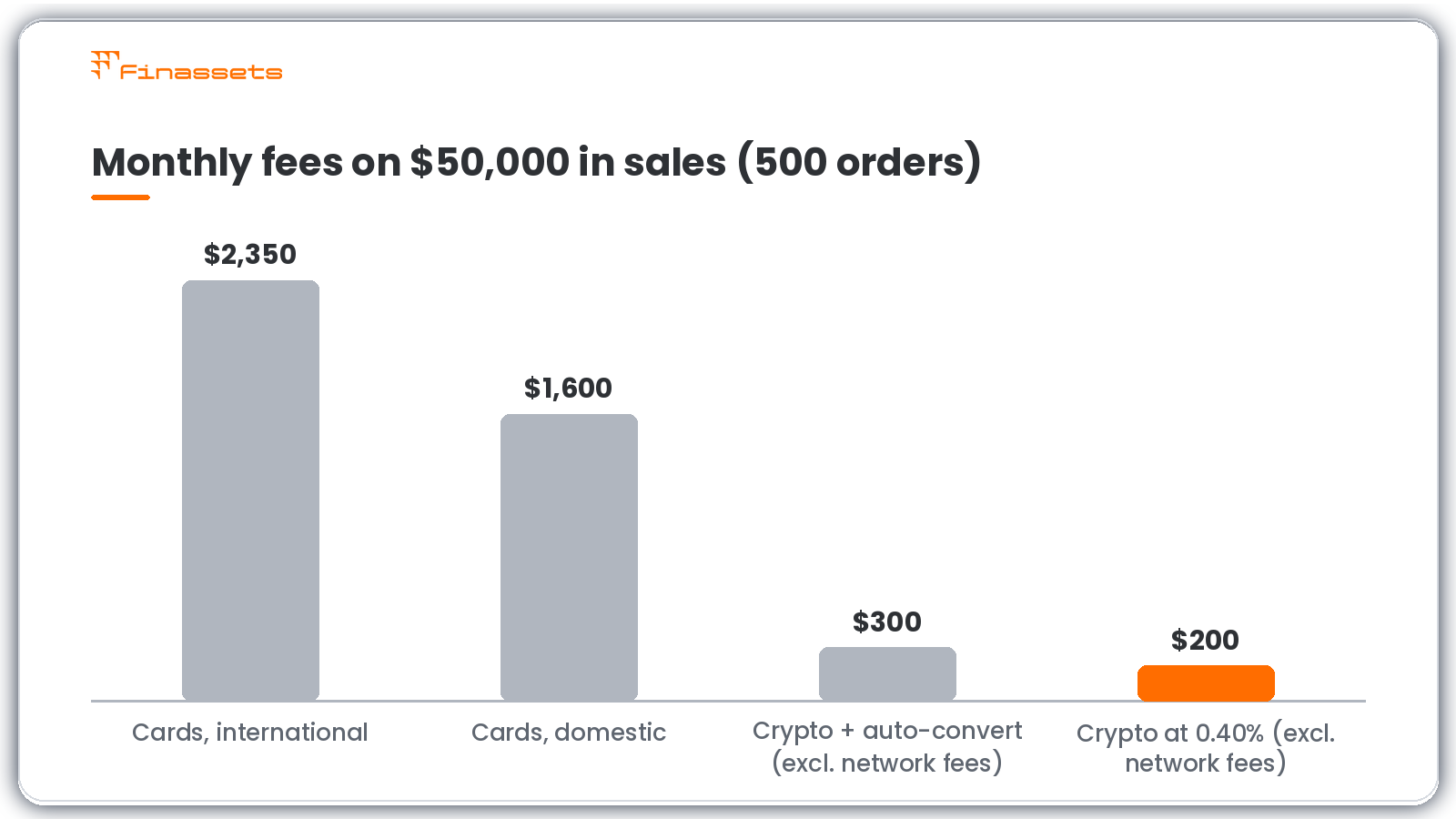
Monthly fees on $50,000 in sales: standard card pricing compared with crypto at 0.40%, before network fees.
The crypto figures exclude network fees, which vary by network and traffic. Your real numbers depend on your coin mix and order sizes.
On TRON, you can lower the network fee. The Finassets TRON Energy Saving System uses pre-purchased Energy instead of burning TRX. It can reduce TRC20 network costs by up to 50%, depending on Energy availability and network conditions. Estimate your savings with the TRON Energy Calculator.
How to accept altcoin payments as a business
To accept altcoin payments, choose your coins, open a merchant account, connect a payment tool, set conversion rules, test and go live. You need a registered business and access to your website. Integration typically takes 2–7 business days.
Follow these six steps:
- Choose your coins and networks. Start with USDT and USDC on two or three networks, plus the altcoins your customers ask for.
- Open a merchant account. At Finassets, registration is usually free. The gateway then checks your business through KYB.
- Pick an integration. A crypto payment button needs only copy-paste code. A crypto payment API with webhooks suits custom checkouts. Crypto invoicing need no integration at all.
- Set your conversion rules. Decide which coins to keep and which to auto-convert into stablecoins.
- Test in the sandbox. Run test payments on each network. Check that webhooks mark orders as paid.
- Go live and monitor. Watch payment statuses, partial payments and network fees in your dashboard.
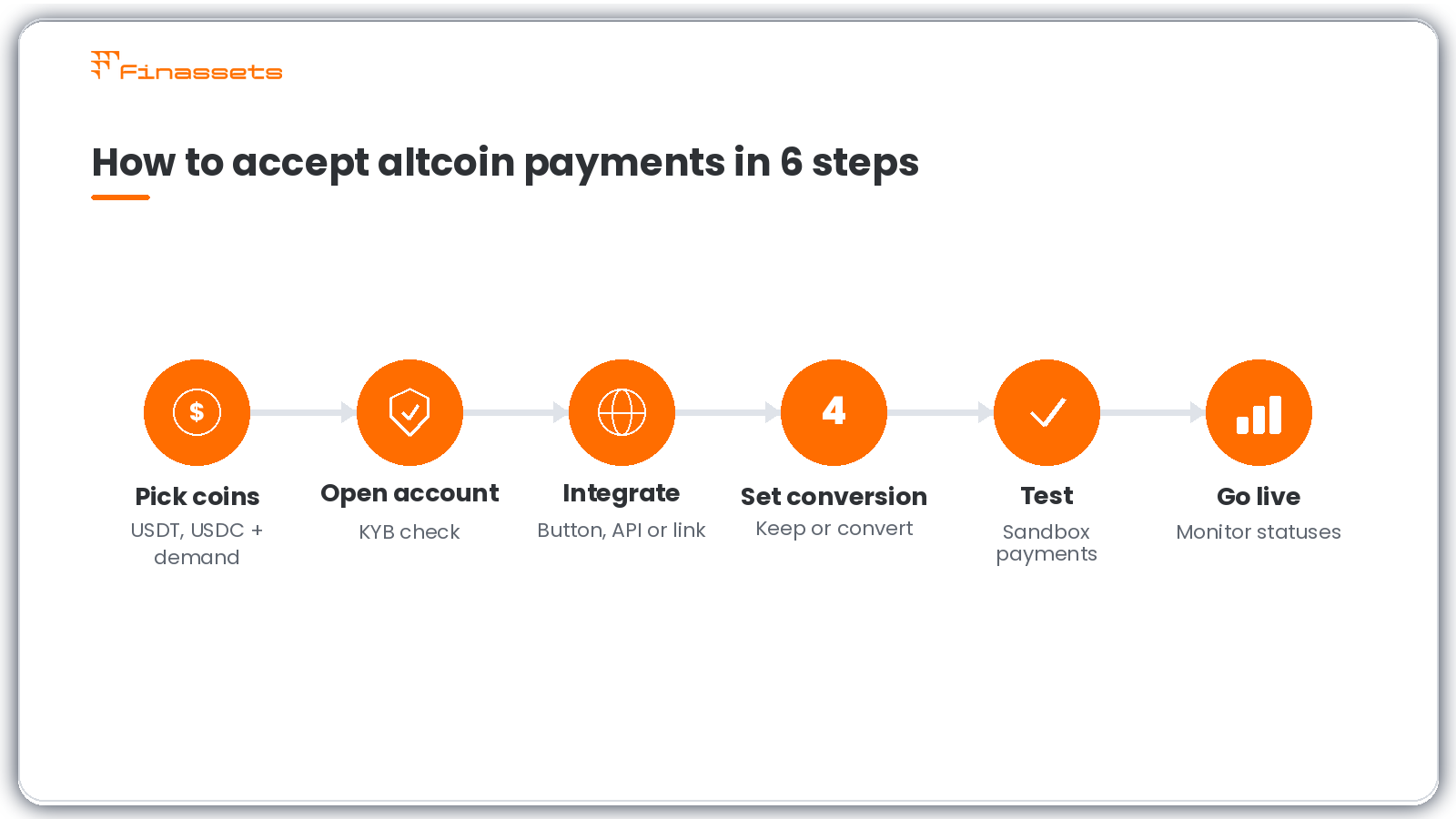
The six steps to start accepting altcoin payments.
Common pitfall: listing too many coins on day one. Each extra network adds support questions and wrong-network risk. Start small and expand based on real demand. For store-specific setup, see how to accept crypto payments in an online store.
10 questions to ask a gateway before you sign
Before you sign with any altcoin payment processor, ask about coins, total fees, conversion, speed, security and compliance. Get the answers to these 10 questions in writing. That lets you compare providers side by side and spot hidden costs early.
- Which coins and networks do you support?
- What is the processing fee, and does it fall as volume grows?
- Who pays network fees, and can they be reduced?
- Can incoming altcoins be auto-converted to stablecoins, and at what fee?
- How fast are payments credited after network confirmation?
- How do you handle underpayments and wrong-network deposits?
- How do I send refunds and payouts?
- Which integrations do you offer: button, checkout, API or payment links?
- How are funds secured: wallet technology, 2FA and access controls?
- Which KYB and AML checks do you run, and how long does onboarding take?
Want to see how providers stack up? Read our guide to compare crypto payment gateways.
How Finassets supports altcoin payments
Finassets is a B2B crypto payment infrastructure provider that lets businesses accept 70+ cryptocurrencies, including major altcoins and stablecoins. Fees range from 0.40% to 0.20% as the volume grows. Incoming payments can be auto-converted into stablecoins, and funds are protected by MPC-based wallet technology.
- Ways to get paid: payment button, hosted checkout, crypto invoicing, payment links and a REST API with webhooks.
- Volatility control: auto-convert into USDT, USDC or DAI via our partner network.
- Security: MPC-based wallet technology, 2FA, role-based access control and IP whitelisting.
- Compliance: risk-based KYB, KYC and AML checks. Cross-border service in eligible jurisdictions, subject to compliance.
- Support: a dedicated account manager and a Telegram support channel.
Final thoughts
An altcoin payment gateway lets you serve customers who hold more than Bitcoin. Start with stablecoins on low-fee networks, add the altcoins your customers ask for and convert volatile coins quickly. Compare total costs, not just the headline fee.
Ready to try it? Try a demo to see altcoin payments in action.
👉 Ready to take the next step? Register your free Finassets business account here!
Article details
- Last updated: November 2, 2026
- Published by: Finassets
- Author: Alena K., Crypto payment solutions specialist
- Category: Altcoin payment gateways
- Reading time: 7–10 minutes
- Content type: Educational guide
- Audience: Online business owners exploring altcoin payment solutions.
Editorial policy
This article is reviewed periodically to ensure the information remains accurate and reflects the latest developments in cryptocurrency payments, blockchain networks, stablecoins, and payment gateway technologies. Content is based on publicly available documentation, industry best practices, and practical payment infrastructure knowledge. It is intended for informational purposes only and does not constitute financial, legal, or investment advice.