

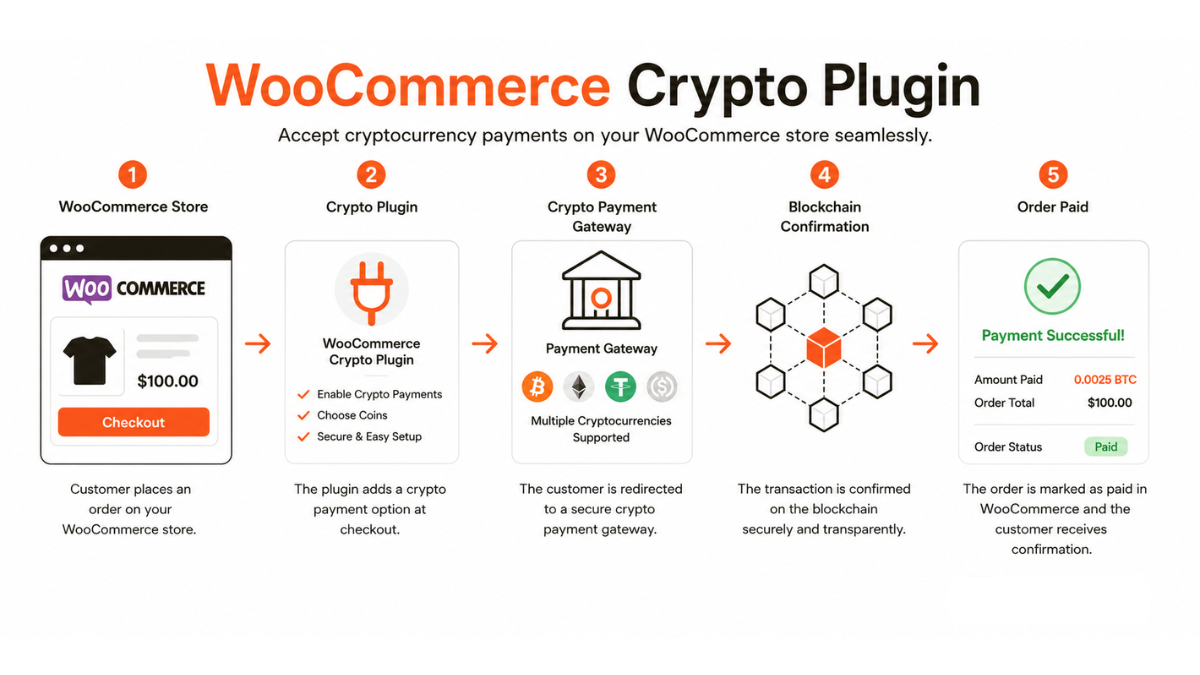
How a WooCommerce Crypto Plugin Integrates Technically
WooCommerce is built on WordPress and exposes a payment gateway API that allows third-party plugins to register as payment methods. A crypto payment gateway plugin hooks into this API at several points: it registers the payment method in the checkout page, intercepts the order submission to generate a crypto invoice via the gateway's API, redirects the customer to a hosted checkout or displays an embedded payment widget, listens for webhook confirmations from the gateway, and updates the WooCommerce order status accordingly.
The entire payment lifecycle — address generation, blockchain monitoring, confirmation detection, and status update — is handled on the gateway's servers. The WooCommerce plugin is a thin integration layer that connects the WooCommerce order system to the gateway's API, not a blockchain client itself.
Installation and Configuration
Most major crypto payment gateways provide official WooCommerce plugins available through the WordPress plugin repository or directly from the gateway's developer portal. Installation follows the standard WordPress plugin process: upload, activate, and configure. Configuration typically requires:
● API key and secret from the gateway dashboard, scoped to the merchant's account.
● Selection of accepted cryptocurrencies and settlement currency.
● Webhook secret for validating incoming payment confirmation callbacks.
● Optional: configuration of confirmation thresholds, payment window duration, and order status mappings.
Once configured, the plugin adds crypto as a payment option at checkout alongside existing methods (card, PayPal, etc.) without requiring any changes to the store's theme or other plugins in most cases.
Order Flow With a Crypto Plugin
When a customer selects cryptocurrency at checkout and submits their order, the following sequence occurs automatically:
1. The WooCommerce plugin calls the gateway API to create a payment invoice for the order total in the merchant's settlement currency.
2. The gateway returns a payment address (or hosted checkout URL), amount in crypto, and expiry time.
3. The customer is directed to the payment page — either a hosted checkout page on the gateway's domain or an embedded widget on the merchant's site.
4. The customer sends the crypto payment from their wallet.
5. The gateway detects the payment, waits for confirmations, and sends a webhook to the merchant's callback URL.
6. The plugin receives the webhook, validates the HMAC signature, and updates the WooCommerce order status to 'Processing' or 'Completed' depending on configuration.
7. The order fulfillment flow (email confirmation, stock reduction, shipping triggers) proceeds exactly as it would for a card payment.
Plugin vs. Custom API Integration — When Each Makes Sense
|
Factor |
Plugin |
|
|
Setup time |
Minutes |
Days to weeks |
|
Technical skill required |
Low (WordPress admin) |
High (developer) |
|
Customisation |
Limited to plugin settings |
Full control over UX and flow |
|
Checkout experience |
Redirect or standard widget |
|
|
Maintenance |
Plugin updates from gateway |
Developer maintains integration |
|
Best for |
SME merchants on WooCommerce |
High-volume or custom checkout requirements |
Known Limitations and Compatibility Considerations
WooCommerce crypto plugins depend on the gateway's webhook delivery being reliable — if a webhook is not received (due to server downtime, firewall rules blocking the gateway's IP, or incorrect callback URL configuration), the order will not update automatically. Merchants should implement a webhook monitoring solution or configure periodic order status checks as a fallback.
Plugin compatibility with other WooCommerce extensions — particularly checkout customisation plugins, page builders, and caching plugins — should be tested in a staging environment before deploying to production. Caching plugins can interfere with the dynamic payment page display; most gateway documentation addresses this with specific cache exclusion rules.
Compliance Note: This glossary entry is provided for general educational purposes only and does not constitute financial, investment, legal, or tax advice. Industry terminology may vary across jurisdictions and providers; definitions herein may not directly reflect the specific features, terms, or specifications of Finassets' services. For details on Finassets' offerings, please refer to official product documentation or contact our team directly.