

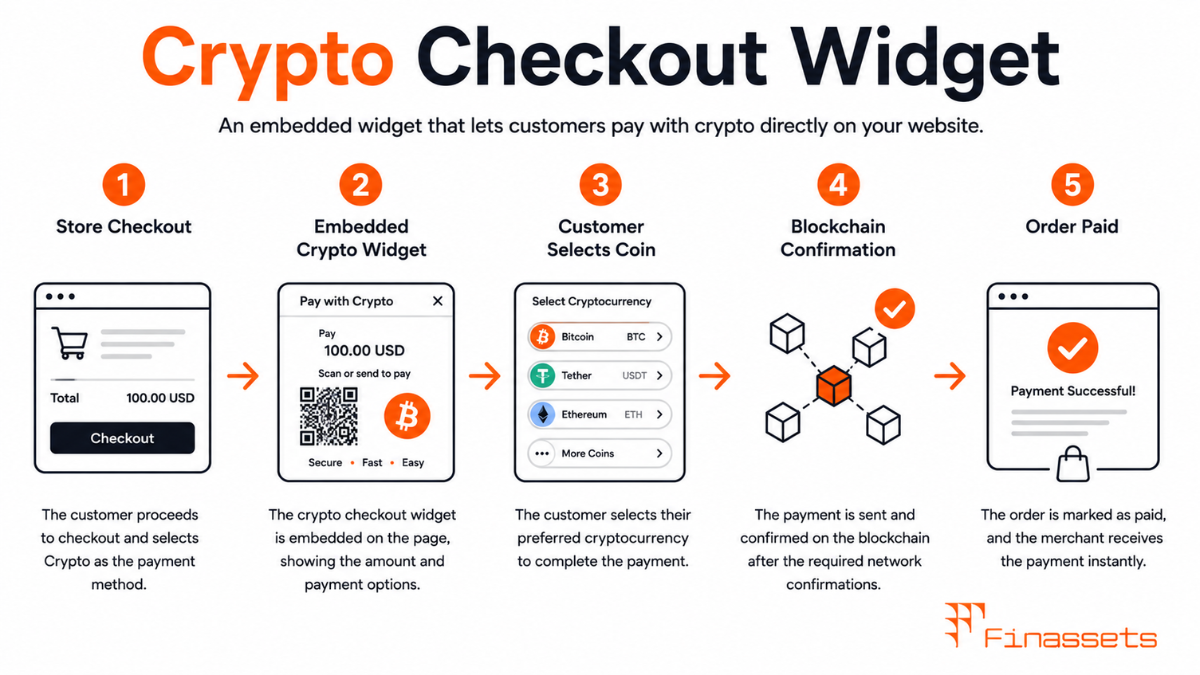
How a Checkout Widget Is Embedded
A checkout widget is typically delivered as a JavaScript snippet — a few lines of code that the merchant adds to their checkout page — which loads the widget's interface from the gateway's CDN. The widget may render as an iframe (an isolated document within the merchant's page) or as a JavaScript-rendered component that injects UI directly into the merchant's DOM.
The iframe approach isolates the widget's execution environment from the merchant's page: JavaScript running in the merchant's page cannot read or manipulate the widget's contents, and vice versa. This provides meaningful security isolation. The direct DOM injection approach gives greater flexibility for styling and layout integration but reduces the security boundary — the widget runs in the same JavaScript context as the merchant's other scripts.
What the Widget Handles Automatically
A fully-featured checkout widget manages the entire payment experience within its rendered area:
● Cryptocurrency selector: displays the merchant's accepted assets with real-time exchange rates against the invoice amount.
● Payment address display: shows the generated wallet address as both text and QR code, with a copy button.
● Payment countdown: a visible timer showing time remaining before the price lock expires.
● Payment detection: polls the gateway API or listens for webhook events to detect incoming transactions in real time.
● Status updates: transitions the widget display from 'Awaiting payment' to 'Payment detected' to 'Confirmed' as the transaction progresses through mempool and confirmation stages.
● Expiry handling: if the window expires without payment, displays an expiry message and optionally allows the customer to generate a new invoice.
All of this functionality is provided by the gateway's widget code — the merchant's developers do not need to implement any blockchain monitoring, confirmation tracking, or status polling logic.
Checkout Widget vs. Hosted Checkout — Which to Choose
|
Factor |
Checkout Widget |
|
|
Customer stays on merchant domain |
Yes |
No — redirected to gateway domain |
|
Conversion rate impact |
Higher (no redirect friction) |
May be lower (domain change uncertainty) |
|
Merchant implementation effort |
Medium (JS embed + CSP config) |
Low (redirect + webhook handling) |
|
Security responsibility |
Merchant's site security affects widget |
Isolated from merchant's site security |
|
Brand control |
High (widget lives in merchant's page) |
Medium (customisable within gateway template) |
|
PCI-equivalent scope |
Wider (widget in merchant's JS context) |
Narrow (payment logic fully off-site) |
Content Security Policy Considerations
Adding a third-party JavaScript widget to a website requires careful Content Security Policy (CSP) configuration. CSP is an HTTP header that controls which external sources a webpage is allowed to load scripts, styles, and frames from. A strict CSP that blocks all third-party scripts will prevent the gateway widget from loading.
Merchants implementing a checkout widget must add the gateway's CDN domain to their script-src and frame-src CSP directives. Gateway documentation typically specifies the exact domains to whitelist. Merchants who use a Content Delivery Network (CDN) for their own assets, or who manage their site through a CMS with CSP controls, need to ensure that the gateway's widget domains are included across all production environments.
Compliance Note: This glossary entry is provided for general educational purposes only and does not constitute financial, investment, legal, or tax advice. Industry terminology may vary across jurisdictions and providers; definitions herein may not directly reflect the specific features, terms, or specifications of Finassets' services. For details on Finassets' offerings, please refer to official product documentation or contact our team directly.