

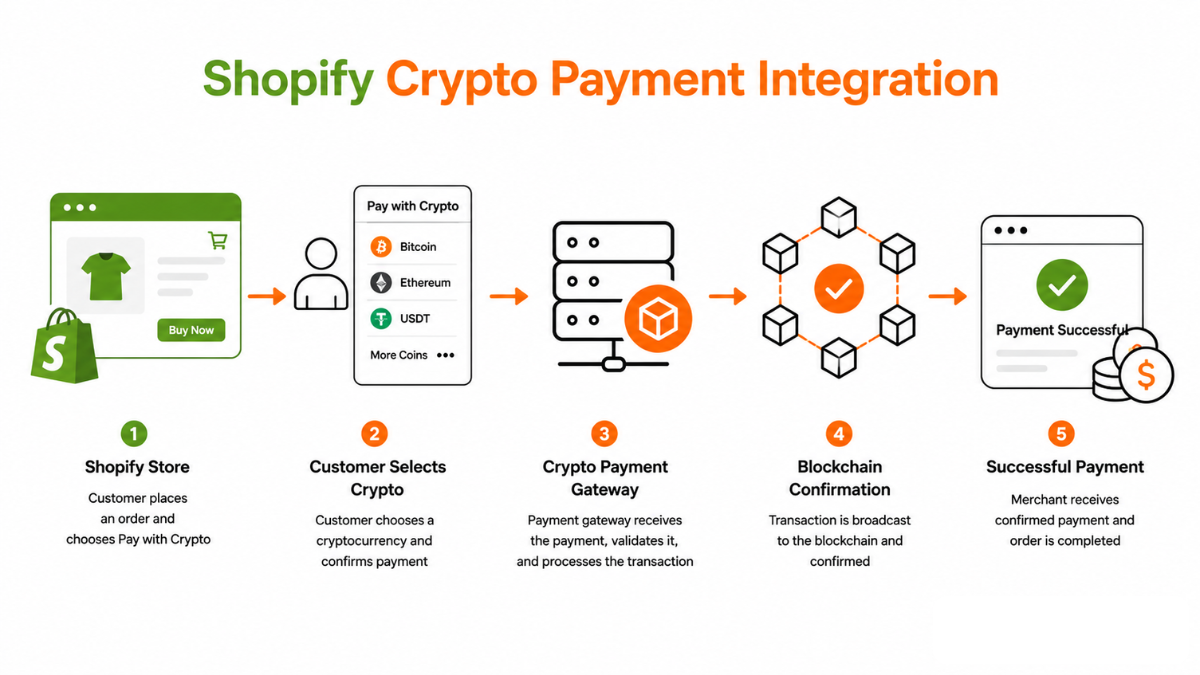
How Shopify's Payment Infrastructure Works
Shopify provides its own payment processing through Shopify Payments (powered by Stripe), but also allows merchants to add third-party payment providers through its Payment Providers program. Payment providers in Shopify's ecosystem integrate at the checkout level: when a customer selects a third-party payment method, Shopify routes the checkout session to that provider's hosted page, then returns the customer to the Shopify order confirmation page once the payment is complete.
Crypto payment gateways integrate with Shopify by registering as Payments Apps through Shopify's Partner Program. This registration allows them to appear as a payment option in Shopify's payment provider settings, with a standardised integration that handles the handoff from Shopify's checkout to the gateway's hosted payment page and back.
Three Ways to Integrate Crypto Payments on Shopify
Shopify merchants can add crypto payment acceptance through three technical paths, each with different trade-offs:
● Shopify Payments App: The gateway builds a Shopify Payments App that integrates natively with Shopify's checkout flow. This provides the most seamless experience — crypto appears as a first-class payment option at checkout — but requires the gateway to be registered in the Shopify Partner ecosystem.
● Custom App with Storefront API: A developer builds a custom Shopify app using the Storefront API to handle crypto payment flows. This provides the greatest customisation but requires significant development effort and ongoing maintenance.
● Third-Party Crypto Payment Gateway (External Redirect): The simplest path — the merchant adds a 'Pay with Crypto' button using Shopify's alternative payment method settings, which redirects customers to a gateway-hosted payment page. Less seamless but requires no app development.
The Shopify-Specific Order Fulfillment Flow
When a crypto payment is confirmed and the gateway webhook fires, the integration must update Shopify's order status via the Shopify Admin API. The gateway's Shopify integration code calls the Admin API to mark the order as paid, which triggers Shopify's standard order fulfillment workflow — stock reduction, email notification, fulfillment service notifications.
This API call requires an OAuth-authenticated connection between the gateway and the merchant's Shopify store, established during the initial integration setup. Merchants should verify that this connection is active and that the gateway's API credentials have the required Admin API permissions (read_orders, write_orders) before going live. A misconfigured connection will result in confirmed crypto payments that do not automatically update order status in Shopify, requiring manual reconciliation.
Shopify-Specific Constraints to Be Aware Of
Shopify's checkout is highly optimised but operates within constraints that affect crypto payment flows. Shopify's checkout sessions have a timeout — if a customer takes too long at the payment step, the checkout session may expire before the crypto payment is confirmed, resulting in a confirmed payment that does not map to an active checkout. Gateways integrate around this by storing the order reference independently and providing the merchant with a reconciliation view of confirmed payments versus Shopify order statuses.
Shopify also restricts checkout customisation beyond what is available through its own checkout extensibility API. Merchants who want a fully embedded widget experience within Shopify's checkout page — rather than an external redirect — need to use Shopify's Checkout Extensions, which requires a Shopify Plus subscription. Standard Shopify plans are limited to external redirect payment flows for third-party providers.
Compliance Note: This glossary entry is provided for general educational purposes only and does not constitute financial, investment, legal, or tax advice. Industry terminology may vary across jurisdictions and providers; definitions herein may not directly reflect the specific features, terms, or specifications of Finassets' services. For details on Finassets' offerings, please refer to official product documentation or contact our team directly.