

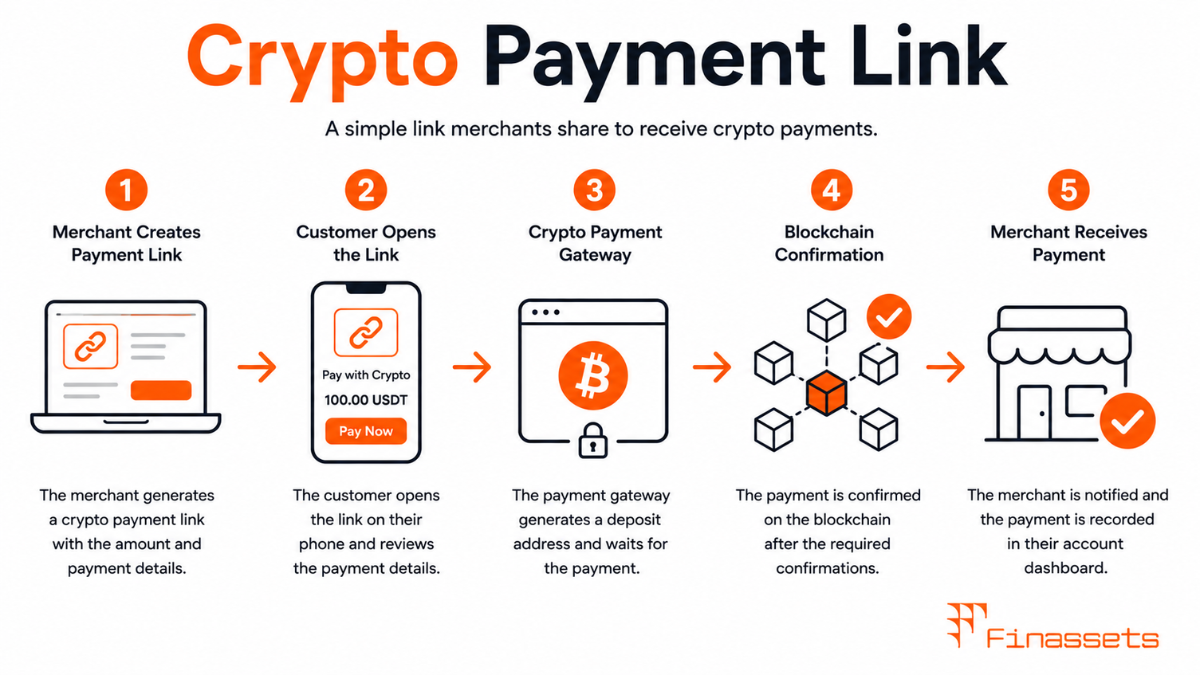
Use Cases Where Payment Links Replace Checkout Integration
Payment links serve use cases where a full checkout widget or API integration would be disproportionate to the need. A freelance consultant sending a monthly crypto invoice to a client does not need a checkout integration — they need a single, shareable URL that takes the client to a payment page. A merchant selling at a market stall cannot integrate a website checkout, but can text a payment link to a customer who wants to pay in crypto. A charity collecting one-off donations benefits from a payment link they can share on social media without any technical infrastructure beyond a gateway account.
Payment links are also used in B2B contexts where the payer and payee have an established relationship. A supplier who invoices a buyer regularly can include a gateway-generated payment link in each invoice, allowing the buyer to pay directly in crypto without the supplier needing to expose their wallet address or manage payment detection manually.
How Payment Links Are Generated and What They Encode
Crypto payment links are created through the gateway dashboard or API by specifying: the invoice amount (in fiat or crypto), the accepted cryptocurrency or list of cryptocurrencies, an optional description or order reference, and the expiry window. The gateway returns a short URL that encodes these parameters and directs the payer to a hosted payment page managed by the gateway.
On the hosted page, the gateway generates a unique receiving address for the payment (via HD wallet infrastructure), displays the current crypto amount equivalent, shows a QR code, and starts the payment window countdown. This entire page and all its logic is served by the gateway — the merchant who created the link does not need to host anything beyond the initial link generation API call.
Payment Link Expiry and Rate Refresh
Every payment link carries an expiry. If the link encodes a fiat amount (e.g., €150), the crypto equivalent displayed on the payment page is calculated at the moment the customer opens the link, not at the moment the merchant generated it. If the merchant generated the link 3 hours ago and the customer opens it now, the rate reflects the current market price, not the rate at generation time.
Once the customer opens the link and the payment page loads, the rate is locked for the duration of the payment window (typically 10–20 minutes), after which the invoice expires. If the customer returns to the same link after expiry, the gateway either regenerates a new rate and restarts the window, or displays an expiry message prompting the customer to request a new payment link from the merchant. Merchants should communicate this expiry behaviour clearly, particularly in B2B invoice contexts where payment may be made days after the link is shared.
Payment Links vs. Other Integration Methods
|
Method |
Technical Requirement |
Best For |
Expiry Handling |
|
Payment Link |
None — just a URL |
Invoices, social media, one-off payments |
Customer returns to link; rate refreshes on new page load |
|
Hosted Checkout |
Redirect from merchant's own checkout flow |
E-commerce with existing cart |
Integrated into checkout session; expiry shows in checkout |
|
Checkout Widget |
JavaScript embed on merchant's page |
Full on-page experience |
Countdown timer displayed inline in widget |
|
API Integration |
Developer integration of all payment logic |
Custom checkout, mobile apps, marketplaces |
Managed programmatically by merchant's code |
Compliance Note: This glossary entry is provided for general educational purposes only and does not constitute financial, investment, legal, or tax advice. Industry terminology may vary across jurisdictions and providers; definitions herein may not directly reflect the specific features, terms, or specifications of Finassets' services. For details on Finassets' offerings, please refer to official product documentation or contact our team directly.