

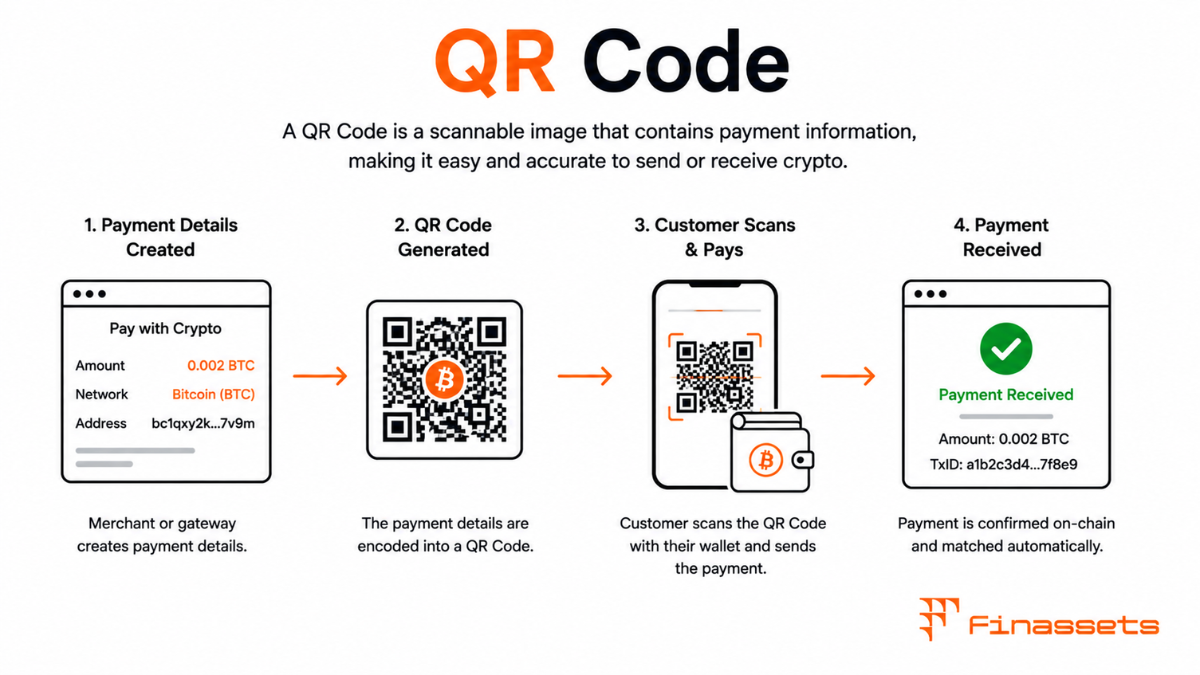
What a Crypto Payment QR Code Encodes
A crypto payment QR code encodes a payment URI — a standardised text string containing the recipient wallet address and, optionally, the exact amount to send, a label for the payment, and a message or description. When a customer scans the QR code with a compatible wallet app, the app parses the URI and pre-populates its 'send' form with the destination address and amount, eliminating manual data entry entirely.
The QR code itself is a two-dimensional barcode using the ISO/IEC 18004 standard. It encodes characters from the payment URI in a matrix of black and white modules, with built-in error correction that allows the code to be read even if up to 30% of it is obscured or damaged (at the highest error correction level, L1). For crypto payment displays, standard error correction level M (15% recovery) is sufficient for normal screen display conditions.
QR Code Generation and Display Best Practices
|
Factor |
Recommendation |
Reason |
|
Minimum size (screen) |
200×200 pixels |
Ensures reliable scanning at typical phone distances |
|
Quiet zone |
4 modules of white space on all sides |
Required by QR spec; missing zone causes scan failures |
|
Contrast |
Black modules on white background |
Maximise scanner reliability; avoid coloured or dark backgrounds |
|
Error correction |
Level M |
Good balance of data density and error tolerance |
|
Refresh on expiry |
Regenerate with new rate and new timer |
Prevent customer scanning expired rate QR code |
|
Copy-address button |
Always provide alongside QR |
Accessibility fallback for users without QR scanner |
How Wallet Apps Parse and Handle QR Codes
Modern crypto wallet apps — MetaMask, Trust Wallet, Exodus, Coinbase Wallet, and native exchange apps — include built-in QR scanners that recognise payment URI schemes for the networks they support. When a user opens the app's 'Send' function and scans a QR code, the app reads the URI, identifies the network and address format, and populates the transaction fields automatically. The user reviews the pre-filled details, confirms, and approves the transaction.
Some wallets support scanning from an image in the device's photo library rather than requiring a live camera scan — useful when a customer is completing a payment on a desktop browser and needs to pay from a mobile wallet. Others support deep linking: clicking a payment URI link on a mobile device opens the wallet app directly with the transaction pre-filled, without scanning a physical code.
Security Risk: Tampered QR Codes
A physical QR code sticker placed over the genuine payment QR code on a checkout page or POS terminal can redirect payments to an attacker's address. This attack requires physical access to the display environment but has been observed in crypto ATMs, physical retail environments, and event ticketing contexts. For online payments displayed on a merchant-controlled screen, this attack is not possible — but merchants who print or display static QR codes in physical spaces should regularly verify that the encoded address matches their expected address by scanning and checking.
Dynamic QR codes — regenerated per transaction by a software system rather than printed as static images — are inherently more resistant to this attack because they change with each invoice. Physical POS crypto setups should always use dynamic QR codes displayed on a device under the merchant's control rather than printed static codes.
QR Codes for Multi-Chain and Multi-Asset Payments
A single QR code can only encode one payment URI, which is specific to one network and one address. A merchant accepting Bitcoin, Ethereum, and USDT must display a separate QR code for each — or implement a network selector that dynamically generates the appropriate QR code based on the customer's choice. Payment gateways handle this through their checkout UI, which displays a currency selector above the QR code and regenerates the code when the customer switches between accepted assets.
Compliance Note: This glossary entry is provided for general educational purposes only and does not constitute financial, investment, legal, or tax advice. Industry terminology may vary across jurisdictions and providers; definitions herein may not directly reflect the specific features, terms, or specifications of Finassets' services. For details on Finassets' offerings, please refer to official product documentation or contact our team directly.